
ETL in Melbourne & Worldwide
Switching Systems Shouldn't Mean Losing Your History
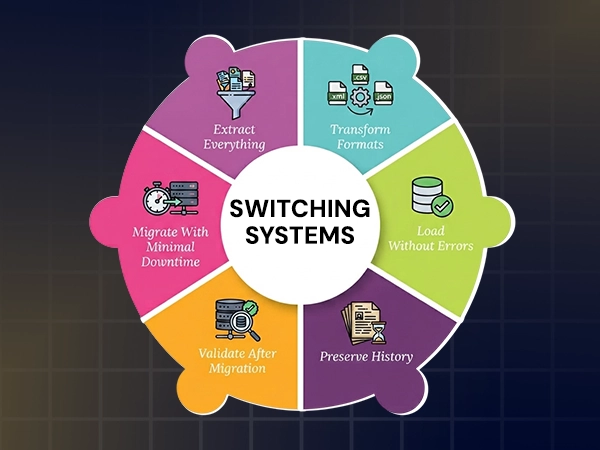
Moving to a new CRM, accounting platform, or database often means years of customer records, orders and transactions need to move too, without corruption, duplication or gaps. ETL extracts data from the old system, transforms it to match the new system’s structure, and loads it correctly, so transitioning to a new system does not require rebuilding historical records. Arrowbyte helps businesses with:
Extract Everything
Pull data completely from the old system
Transform Formats
Match old data to the new system’s structure
Load Without Errors
Records are migrated accurately, without duplication or loss
Preserve History
Years of records carry over, not just recent data
Validate After Migration
Confirm data matches before the old system is decommissioned
Migrate With Minimal Downtime
Business keeps running during the transition
Successful Migrations Depend On Thorough Testing
Moving data once and assuming it has transferred correctly is not a dependable approach when transferring years of business records. Arrowbyte runs the transfer against a test environment first, checking the results match before anything is migrated to the live system your business depends on. Arrowbyte tests the migration thoroughly before anything is transferred to your live records, so your historical data is migrated accurately. If you’re planning a system switch and need your data preserved throughout the migration, contact our team for a free ETL consultation.

Insufficient Migration Testing Can Affect Data Integrity
A migration that is not tested thoroughly can introduce data corruption or incomplete records, which may only become apparent weeks later when someone cannot access a customer’s historical order information.
- Untested migrations risk undetected data corruption
- Mismatched formats can affect data integrity during the transfer.
- Skipped validation can leave missing records undetected.
- No rollback plan limits recovery options.
Running An ETL Migration That Can Be Trusted
- Map every field from the old system to the new one
- Test the full migration in a staging environment first
- Validate record counts and totals match after the transfer
- Keep the old system accessible until the new one has been verified
- Plan for a rollback, if the migration needs to be reversed
- Document the mapping, so future migrations can follow an established process
Services
+61 491 979 548