
Azure in Melbourne & Worldwide
Staff Already Have One Login, Your Systems Should Use The Same Identity
If your team already signs into Outlook, Teams and SharePoint every day, they already have a Microsoft identity your other business systems can use as well. Azure connects directly to that same identity, so staff access business applications with the login they already have, instead of using a separate set of credentials for every new system introduced into the business. Arrowbyte builds Azure for businesses with:
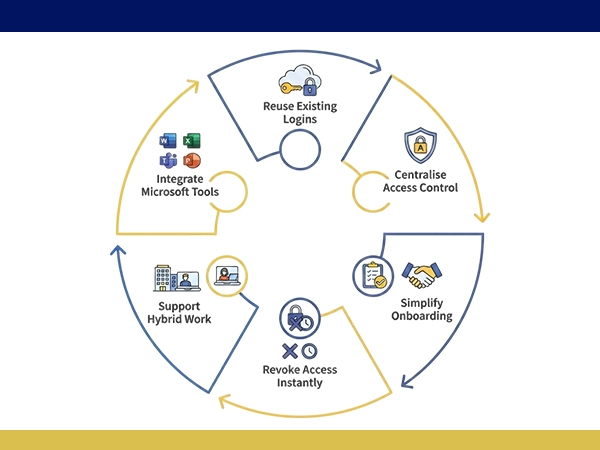
Reuse Existing Logins
Staff sign in with credentials they already use
Centralise Access Control
Manage every application’s access from one place
Simplify Onboarding
New staff get access with the appropriate configuration
Revoke Access Instantly
Remove a leaving employee’s access across all connected systems
Support Hybrid Work
Secure access whether staff work remote or on-site
Integrate Microsoft Tools
Works directly alongside Teams, SharePoint and Outlook
One Identity System, Not Multiple Independent Login Systems
Every new business tool without shared login usually means another password for staff to remember and another account for IT to manage separately. Azure lets Arrowbyte connect new systems to the identity your business already has, so access stays centralised instead of being distributed across multiple independent login systems. Arrowbyte sets up Azure around what your business already uses, so access stays centralised and secure. If disconnected logins are affecting your access control, contact our team for a free Azure consultation.

Disconnected Logins Can Create Security Risks
When staff access systems through separate, unconnected logins, removing access when someone leaves means reviewing and updating every individual account. Accounts that are not removed may remain active longer than intended.
- Forgotten accounts stay active after staff leave
- Separate logins increase password reuse and risk
- Manual access removal misses individual systems
- Inconsistent permissions across disconnected platforms
Implementing Azure With Your Existing Systems
- Connect new applications to your existing Microsoft identity first
- Set access permissions by role, not by individual manual approval
- Enable multi-factor authentication across every connected application
- Review access regularly, removing permissions no longer needed
- Test access removal on a leaving staff member before relying on it
- Plan for hybrid work, since staff access systems from multiple locations
Services
+61 491 979 548